
We Offloaded iOS Builds to 3.6¢/hr Linux VMs So Coding Agents Could Stop Melting Our Mac
How we built Boop: parallel Linux SwiftUI builds, zero-cloud-secret macOS signing, and an iPhone Build Inbox powered by Firebase App Distribution.
Parallel coding agents in Git worktrees are magic — right up until you work on a native iOS app.
Last week, while building Polka (our native iPhone mini-apps shell with a shared input deck, paired Mac agents, 37 SwiftPM packages, Firebase, GRDB, FluidAudio, custom Metal shaders, and Icon Composer assets), five parallel xcodebuild runs pushed our 16 GB M1 Mac’s load average above 600. Every agent ground to a halt. We had to add a rule to AGENTS.md: one build at a time, no Git worktrees, this Mac cannot take two.
That felt backwards. Why was an interactive laptop burning 12 GB of RAM compiling Firebase and swift-syntax just so three coding agents could iterate in parallel?
So we built Boop — an open-source, single-binary Rust CLI that moves the heavy Swift compilation onto cheap Linux VMs ($0.036/hr), keeps all Apple signing keys strictly on your Mac, overlays local Metal shaders and app icons in milliseconds, and turns Firebase App Distribution into an untethered iPhone Build Inbox for your agents.
The Split Architecture: Zero Apple Keys on the Cloud
The core idea behind Boop is simple: compile on Linux, finish on macOS.
A macOS host is still great at editing code, running git, compiling .metal shaders and .icon asset catalogs, signing binaries with macOS Keychain, and talking to a physical iPhone. The only thing that destroys an 8–16 GB MacBook is the Swift/Clang build graph itself.
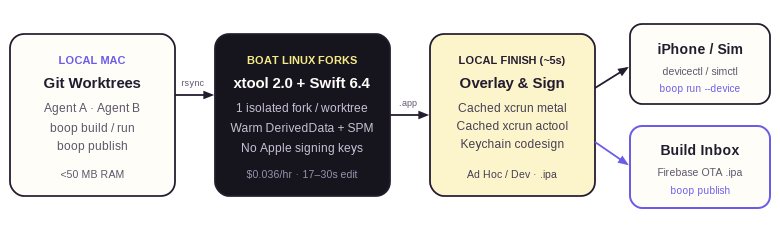
Boop hard-excludes .env*, *.p8, *.p12, *.pem, *.key, *.mobileprovision, and SSH keys before rsync ever runs. Your remote Linux VM never sees a single Apple signing certificate.
Wait — Does Claude or Codex Run on the Linux Sandbox?
No. Your coding agents (Claude Code, Codex, Antigravity, Rex/Herdr panes) still run locally on your Mac inside normal Git worktrees. The Linux VM is purely compiler muscle — Swift 6.4, xtool 2.0, the slim Darwin SDK, and rsync.
When an agent edits Swift locally and runs boop build --json, Boop pushes the changed files over multiplexed SSH, runs xtool2 remotely, and hands structured compiler diagnostics (file.swift:42: error: ...) right back to the local agent to fix. Keeping the brain local and the compiler remote means:
- Zero remote secrets or duplicate setup: Your LLM logins, MCP servers, Git SSH keys, Apple Keychain certificates, and Firebase tokens never leave your Mac.
- ~90–95% less local disk churn: Multi-gigabyte
DerivedData,.ofiles, and SwiftPM checkouts live on the remote fork instead of burning 30–60 GB of local SSD across worktrees. - Agents alone don’t melt your Mac: Five CLI coding agents in Rex or Herdr use roughly 1–1.5 GB RAM total (the LLM runs in the cloud) and
boopuses <50 MB — compared to 6–12 GB per concurrentxcodebuild. Plus, deploying OTA to a real iPhone saves another 2–4 GB by not booting an iOS Simulator.
What Actually Broke When Compiling a Real iOS App on Linux
Getting a hello-world SwiftUI app to build on Linux with xtool 2.0 (which drives SwiftBuild directly) took ten minutes. Getting Polka — with Firebase, GoogleAppMeasurement, GRDB, swift-syntax, Metal shaders, and 11 Icon Composer .icon files — to build cleanly turned up five real gaps we had to solve:
- macOS AppleDouble
._*tar corruption: When you tar up a slimdarwin.xtoolsdkon macOS withoutCOPYFILE_DISABLE=1, macOS injects._iPhoneOS.platformresource forks into the archive. SwiftBuild on Linux immediately crashes withInfo.plist was malformed: Not a directory (20). - Firebase codeless frameworks +
CodesignTool:xtool 2.0.0-beta.1’s in-process codesigner rejected--generate-pre-encrypt-hashespassed by SwiftBuild for vendor frameworks likeGoogleAppMeasurement, and linking those stub binaries needed an Appleld64.lldwrapper on Linux. We patched this cleanly and contributed both fixes upstream in xtool-org/xtool#464 (22/22 Linux Docker tests passing). - Missing
lipo: SwiftBuild invokeslipofor universal framework slices; symlinking Ubuntu’sllvm-lipoto~/.local/bin/liposolved it cleanly. - Metal shaders (
default.metallib): Apple’smetalcompiler is macOS-only. Boop installs a tiny no-op shim on Linux so compilation succeeds, then compiles configured.metaldirectories locally viaxcrun -sdk iphoneos metal+metallib, cached by content SHA-256 (<0.5scold,<5mswarm), and overlaysdefault.metallibinto the pulled.app. - App icons & Asset Catalogs (
actool): Our first OTA build installed on an iPhone and ran — with a blank white grid icon, because Linux uses a dummyactoolshim. Adding a hash-cached localxcrun actooloverlay in Boop compiles Polka’sAppIcon.iconintoAssets.car+AppIcon60x60@2x.png(3.9 MBfor primary icon vs43 MBfor all 11 alternates!), recursively mergesCFBundleIconsintoInfo.plist, and caches it forever (<5mswarm).
All of the Linux-side pieces live in one idempotent bootstrap script that automatically reads your Mac’s active Xcode SDK and actool version so it works across Xcode releases.
Real Benchmarks (Including Our Own Mistakes)
Every timing below was measured on Polka (Debug-iphoneos → iPhone 14 Pro) comparing our 16 GB Apple M1 Mac against a 4 vCPU / 8 GB Boat.dev default VM ($0.036/hr).
| Measurement | Local M1 Xcode | Boop (4 vCPU Linux) | Result |
|---|---|---|---|
| Clean compile (warm SPM cache) | 8m 14s (494.45s) |
3m 38s (218.04s) |
2.27× faster (~$0.0022) |
| 1-line SwiftUI edit — compile + link | 49.58s |
27.24s |
1.82× faster |
| 1-line SwiftUI edit — end-to-end → iPhone | 57.18s |
37.53s |
19.65s faster, <50 MB Mac RAM |
The Hilarious 2-Minute Bottleneck That Had Nothing to Do With Swift
Our very first end-to-end run took 7m 00s, and when we added per-stage instrumentation we burst out laughing:
- Remote Swift compilation:
218.04s - Local macOS signing:
117.59s(!)
Why was signing taking two full minutes? Boop was invoking security cms -D -i sequentially on all 63 provisioning profiles in ~/Library/Developer/Xcode/UserData/Provisioning Profiles/ (115s), then re-signing unchanged third-party frameworks like FirebaseAnalytics and GoogleAppMeasurement every single run (~5s).
We added two caches in sign.rs:
- A CMS-decoded profile metadata index keyed by
(path, mtime, size), still running a final livesecurity cms -Dverification on the single winning profile. - A content-addressed signed-framework cache for
<10 MBvendor frameworks, plus parallel inside-outcodesign.
Local signing dropped from 117.59s → 1.67s — a 70× speedup — and delta rsync --no-whole-file --inplace dropped .app pulls from 7.01s to 2.48s. Total non-compile overhead for a full edit → live iPhone launch is now under 10 seconds.
An Honest Negative Result: SwiftBuild CAS Across Worktrees
We were excited to try SwiftBuild’s content-addressable compilation cache (CAS) to share compiled modules across Git worktrees. We ran a 4-row controlled experiment on Polka:
| Scenario | Clean Compile Time | CAS Disk Size | vs CAS-Off (218.04s) |
|---|---|---|---|
| Baseline (CAS disabled) | 218.04s |
0 |
— |
| Worktree A — cold CAS | 339.13s |
231 MB |
+121s slower |
| Worktree A — clean DerivedData, warm CAS | 354.86s |
232 MB |
+137s slower |
| Worktree B (different path) — warm CAS | 296.98s |
272 MB |
+79s slower |
Setting COMPILATION_CACHE_ENABLE_CACHING = YES in project.pbxproj didn’t propagate into SwiftPM package targets (hits = 0), so CAS overhead made builds 40–60% slower. Rather than faking a win, we left CAS off by default and solved cross-worktree speed a much simpler way: forking warmed VMs.
Fork-per-Worktree Pools on Boat
Instead of sharing mutable DerivedData or fighting path-sensitive compiler caches, Boop warms one base Boat VM (boop pool warm) and snapshots it. Whenever a coding agent opens a new Git worktree and runs boop build or boop publish, Boop leases an isolated Boat fork of that warmed snapshot — inheriting all 37 cached SwiftPM repos and the warm build database at the exact same absolute path.
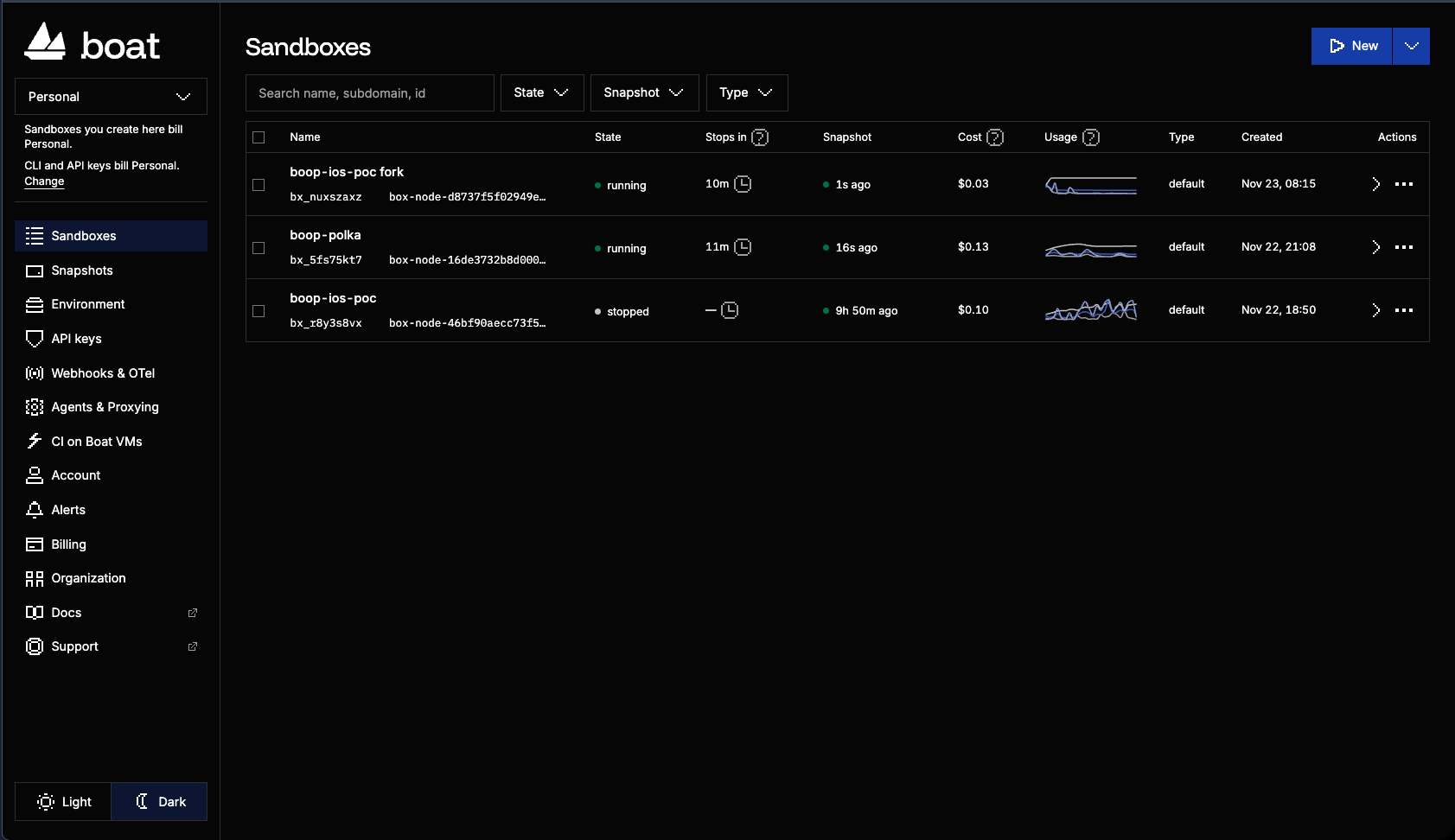
One subtlety we caught: while Boat hydrates a large ~591,000-file snapshot lazily in the background, file modification times momentarily appear at whole-second granularity — which tricked SwiftBuild into rebuilding everything (290.6s). Boop now waits for native disk readiness and restores saved sub-second build timestamps before syncing. After that one-time fork warm-up, two coding agents editing Polka simultaneously compiled in 13.2s and 28.4s on distinct forks, overlapping cleanly with >5.1 GiB RAM free on each worker.
The Plot Twist: Turning Firebase Into an iPhone Build Inbox
boop run --device is great at your desk with a USB cable. But once three agents are working on three branches in parallel, you don’t want to switch worktrees and plug in your phone for each one.
You want an inbox on your iPhone where every finished agent branch shows up with a name, release notes, commit hash, and a Download button.
It turns out Firebase App Distribution gives you this for free. So we added boop publish:
boop publish \
  --name "New keyboard animation" \
  --notes "Spring transition and haptic tuning" \
  --json
In one command, Boop:
- Compiles on the worktree’s leased Linux fork (
debugby default to reuse warm caches). - Pulls the delta
.appto your Mac and overlays local hash-cached Metal shaders +AppIcon.icon(Assets.car). - Stamps a unique sortable
CFBundleVersion(YYYYMMDD.HHMMSS) into.app/Info.plistwithout dirtying Git. - Signs locally with your macOS Keychain (Ad Hoc distribution profile preferred, automatic Development fallback).
- Packages a clean
Payload/Polka.app.ipaviaditto --norsrcand uploads to Firebase App Distribution. - Saves the build record (
build_id,testing_uri,branch,commit,worktree_id) locally soboop buildsshows your whole inbox.
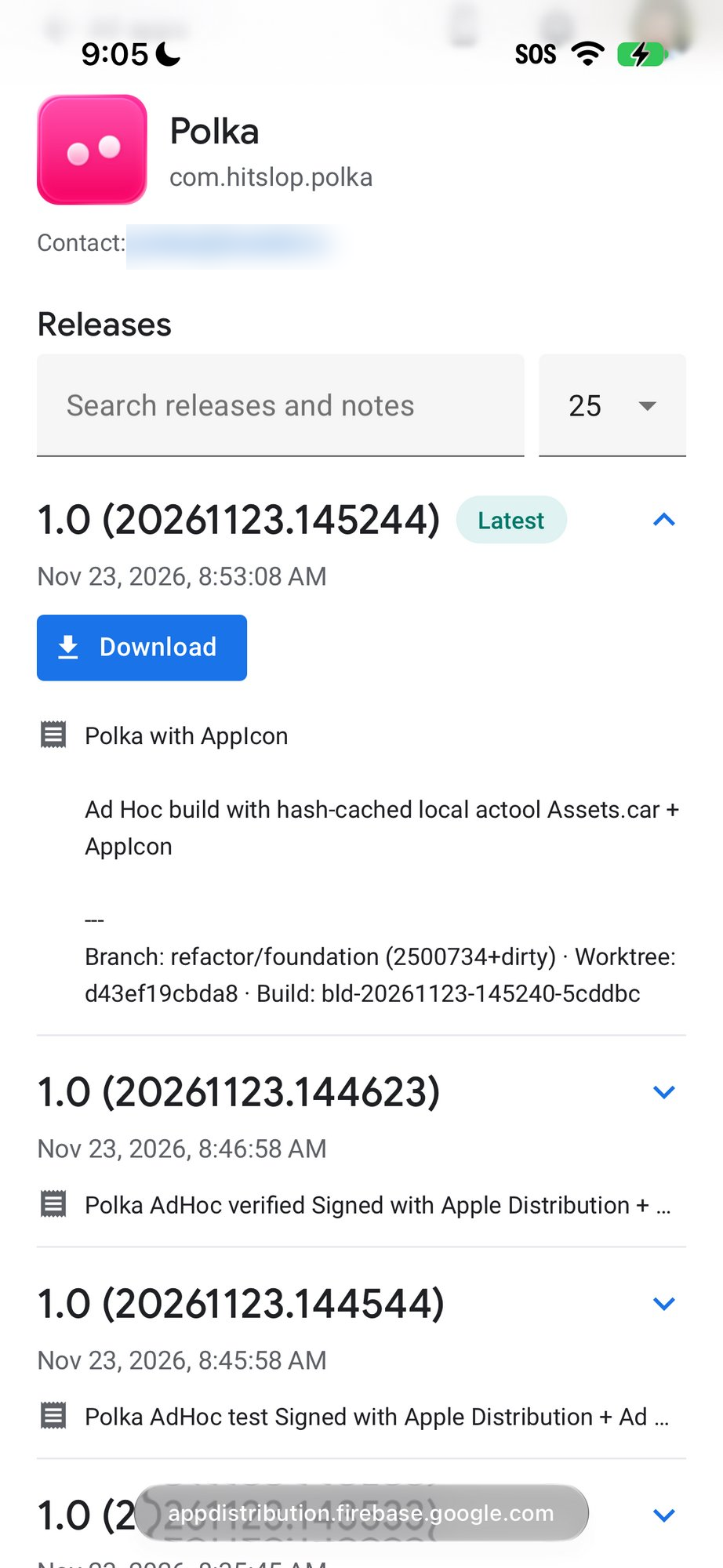
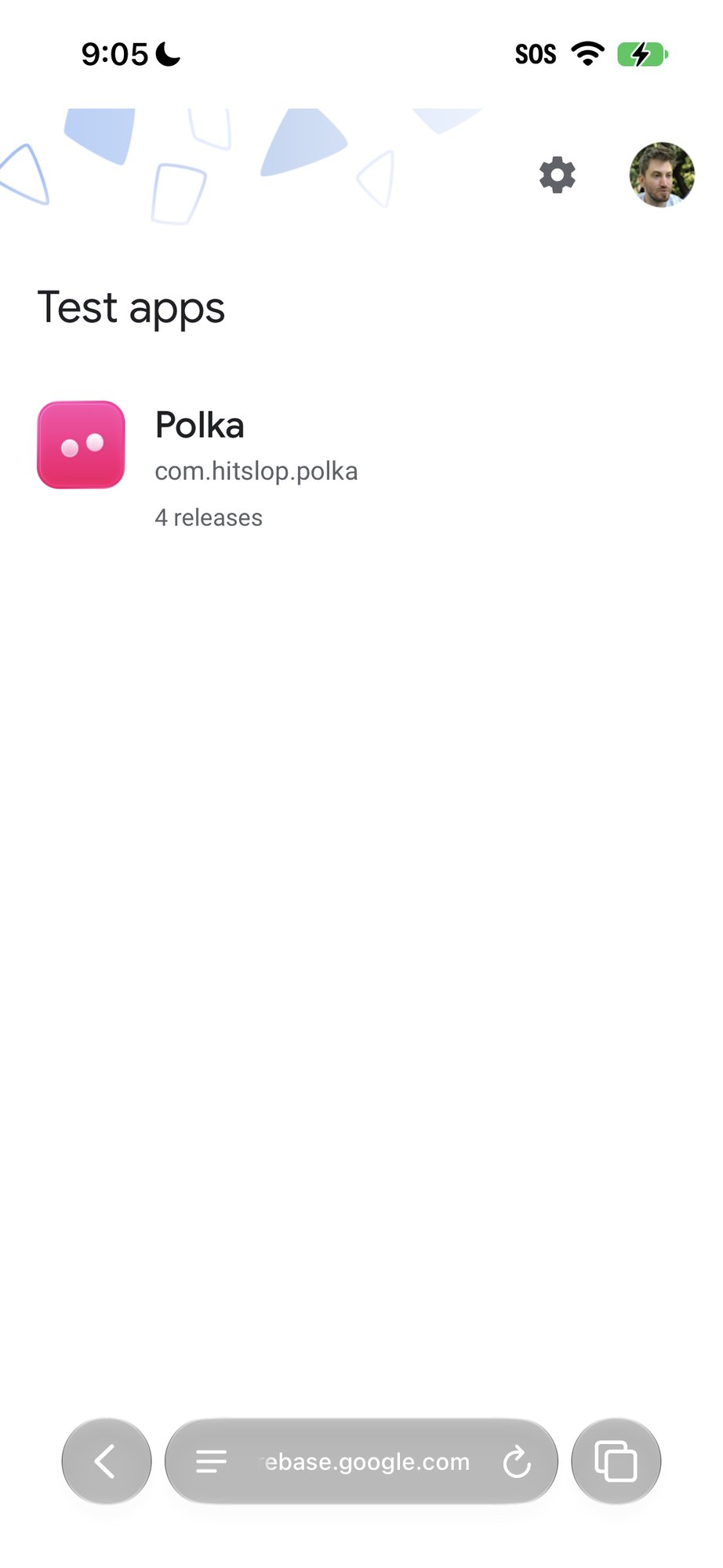
You install the Firebase App Tester web clip once on your iPhone Home Screen, and every agent build lands right there — complete with your real app icon, commit hash, worktree ID, and Metal shaders.
Why pull the
.appback to macOS instead of uploading straight from Linux? Technically, for a simpler app without Metal shaders or asset catalogs, a Linux sandbox could sign viaxtooland upload straight to Firebase — but that requires putting your Apple Distribution.p12private key, password, and Firebase service account onto a remote cloud VM. Since your coding agents are already running on your Mac, spending 2.5 seconds on a deltarsyncpull keeps zero Apple credentials in the cloud and gives you realxcrun metal+xcrun actoolfor free.
The Dream: A Modern Timeshare Laptop
In the 1970s, you didn’t haul a mainframe in your backpack — you sat at a quiet, lightweight terminal wired into shared compute. Then for three decades we stuffed increasingly hot, expensive workstations into laptops just to run local C++ and Swift compilers.
Agent-native development flips that equation right back around.
Everything in this post — every benchmark, every concurrent fork build, every Ad Hoc Firebase publish — was built and tested on a six-year-old 2020 M1 MacBook Air (16 GB). Not a $4,000 MacBook Pro.
And with Apple now shipping the ultra-lightweight MacBook Neo — and Mark Gurman reporting that the spring 2027 MacBook Neo 2 is jumping from 8 GB to 12 GB of unified memory and an A19 Pro — the punchline starts looking like a genuinely viable daily setup:
- A quiet, colorful Citrus MacBook Neo acts as your timeshare cockpit — running Rex/Herdr terminals, lightweight CLI agents, Git, and local macOS signing.
- A fleet of ephemeral $0.036/hr Linux forks handles parallel Swift compilation across worktrees without ever spinning a fan or filling your SSD with
DerivedData. - Your iPhone becomes an untethered Build Inbox, pulling down signed, icon-ready, Metal-accelerated agent builds over the air wherever you are.
The laptop stops being the factory and goes back to being the steering wheel.

Try It Yourself
Boop is MIT-licensed at github.com/hitSlop/boop and works with either Boat.dev or any Ubuntu x86_64 SSH box:
git clone https://github.com/hitSlop/boop.git
cd boop && cargo build --release
ln -sf "$(pwd)/target/release/boop" ~/.local/bin/boop

# Inside your iOS project (Boat.dev or generic Ubuntu SSH):
boop init --provider boat --bootstrap
# or: boop init --provider ssh --ssh-host ubuntu@your-box --bootstrap

boop doctor
boop run --device
boop publish --name "First Linux OTA build" --notes "Built on Linux, signed on Mac"
What’s Next
Right now boop publish uses a single bundle ID (sequential installs on your iPhone). Next up:
- Stable preview bundle-ID slots (
com.example.app.preview1..3) so three agent experiments can live side-by-side on your Home Screen. - Routing tester feedback back to the agent: attaching the installed build’s exact Git commit, worktree ID, and crash logs straight back to the coding agent that produced it.
If you’re trying to do real native iOS development with parallel coding agents — or trying to keep an 8 GB MacBook alive — give hitSlop/boop a spin and let us know what breaks.